Every Shelf Photo Tells a Story: How AI Turns In-Store Images into Sales Insight
Your reps are already taking the photos.
On a typical store visit, a field sales rep will photograph the shelf, the promotional display, the chiller or the end-of-aisle bay.
Multiply that across a team, a journey plan and a year, and a business can easily be sitting on tens of thousands of in-store images.
The question is: how many of them does anyone actually look at?
For most sales teams, the honest answer is very few. The photo gets taken, attached to the visit, and filed away. It proves the rep was there. It rarely tells anyone anything new.
That is starting to change.
Photos as evidence, not insight
Most organisations treat in-store photos as a record. They are useful when there is a dispute, or when a manager wants to check that a promotion went up as agreed.
But reviewing them properly takes time that nobody has.
A sales manager with ten reps, each visiting eight to twelve stores a day, cannot open and study every image. Even if they could, spotting a missing product or a price that has crept up is slow, manual work.
So the information in the photo, which is often the most direct view of what is actually happening in store, goes unused.
The orders tell you what the customer bought. The shelf tells you what the shopper can actually buy. Those are not always the same thing.
What a shelf photo can tell you
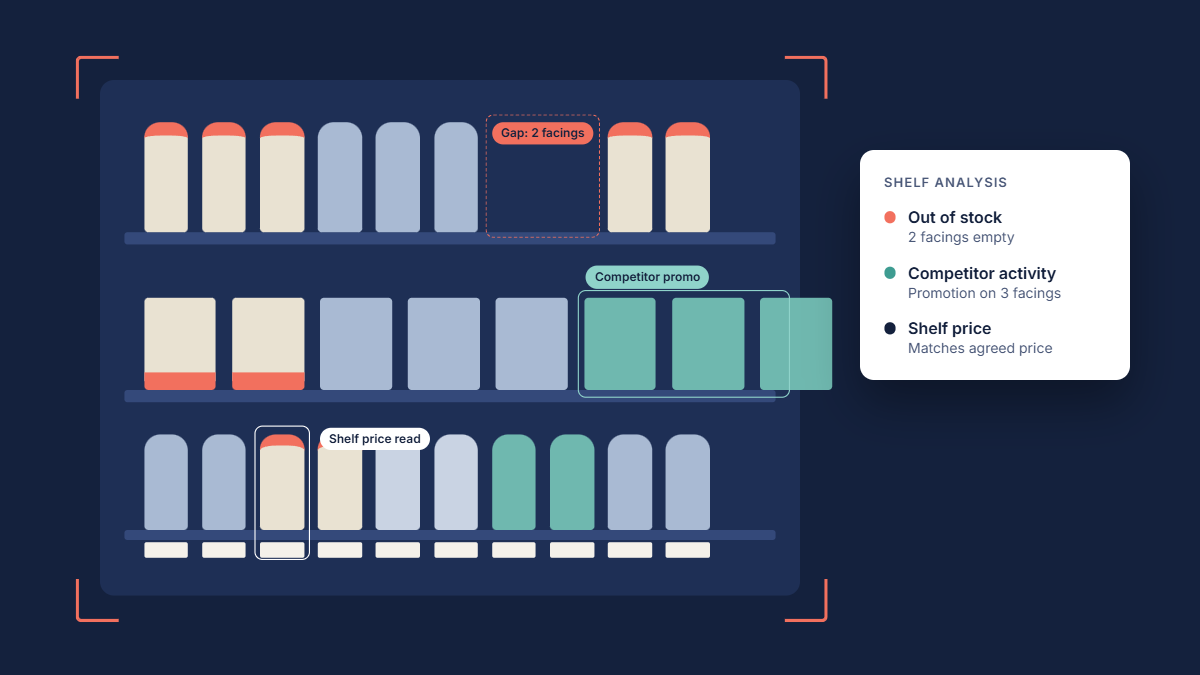
AI image analysis can now read a shelf photo in seconds and pull out the information a manager would otherwise have to find by eye. Here is what that looks like in practice.
1. Availability and out-of-stocks
Is the product on the shelf? Are there gaps where it should be?
An out-of-stock is a lost sale for both the retailer and the supplier, and it often goes unnoticed until the next order is smaller than expected. Spotting gaps from the photo means the rep can raise it on the spot, while there is still something to be done.
2. Shelf pricing
What price is the shopper actually seeing?
Shelf-edge labels can be read from the image and compared against the recommended retail price or the agreed promotional price. A promotion that was agreed but never reached the shelf is money spent with nothing to show for it.
3. Competitor activity
Who else is on the shelf, and what are they doing?
A new competitor line, a competitor promotion or a rival taking extra facings is exactly the kind of thing a rep might notice on one visit but that rarely gets reported consistently. Across hundreds of stores, those observations become a picture of what the competition is doing in the market.
4. Promotional and display compliance
Did the display go up? Is the point-of-sale material in place? Is the product in the agreed position?
This is often the reason the photo was taken in the first place. AI can check it automatically rather than relying on someone to review it later.
5. Share of shelf
How much space does your range have compared with the category?
Tracked over time, share of shelf is one of the clearest indicators of how a brand is really performing in a store, and one of the hardest to measure manually.
The real value: photos plus everything else
A single photo analysed on its own is useful. The bigger opportunity comes from connecting what the shelf shows with the data you already have.
Consider a customer whose orders for a key product have dropped over the last six weeks. On its own, the sales report raises a question but doesn't answer it.
Now add what the shelf photos show:
The product has been out of stock on three of the last four visits.
A competitor has taken two of its facings.
The competitor product is on promotion at €2 below yours.
Suddenly the rep isn't walking in to ask why orders are down. They are walking in knowing why, with a specific problem to solve and a conversation ready to have.
The same applies to:
- Audits and surveys: does what the rep recorded match what the photo shows?
- Promotions: did the agreed promotion actually translate into a change on the shelf, and in sales?
- Territory trends: is a competitor gaining ground in one region before the others?
Orders, surveys, audits and photos each tell part of the story. Together, they tell you what is really happening with a customer.
Being realistic about what AI can do
Image recognition has improved enormously, but it isn't magic, and it is worth being clear about that.
Results depend on the photo. A blurred image, a shelf shot at a sharp angle or a label hidden behind a price sticker will be harder to read. Clear guidance for reps on how to take photos makes a real difference to the quality of what comes back.
It also works best where it knows what it is looking for. Recognising your own product range is far more reliable than identifying every product in a crowded category.
And as with any AI-powered insight, it should support the salesperson, not replace them. The photo might show a competitor promotion. Only the rep, in conversation with the buyer, will find out whether it is a one-off or the start of a range change.
What AI does well is the part nobody has time for: looking at every photo, every time, and flagging the ones that matter.
From the shelf to the next sale
The shelf is where a brand's sales strategy either works or doesn't. It is also where most sales teams have the least visibility.
Your reps are already standing in front of it, phone in hand, on every visit. The photos are already being taken.
The next step is making sure someone, or something, is actually reading them.
Make every photo count
IntelliBrand reps capture photos alongside orders, surveys and audits on every customer visit, so the images sit with the rest of the account history rather than in a separate folder.
We have spent years working on how AI can turn those photos into clear insight on availability, pricing and competitor activity, and how that insight fits alongside the sales data reps and managers already rely on.
If you'd like to see how IntelliBrand can help your team get more from every store visit, get in touch to arrange a demo.